Platform
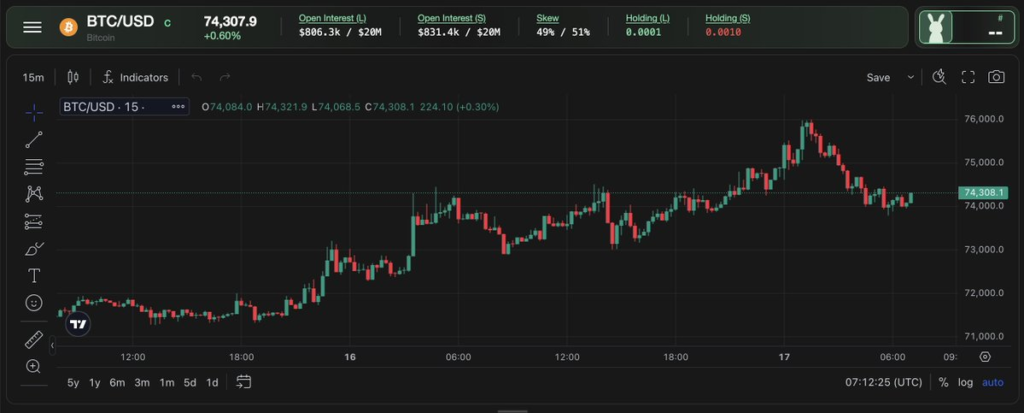
Carrotfunding x TradingView Charts
The industry standard for technical analysis. Directly in your prop trading terminal. We’re proud to announce that Carrot has offi...
Read article

If you’re reading this, you’ve probably traded on MT5 before. You might be on it right now, running a challenge at another prop firm, managing your charts in one window, checking your drawdown in another and wondering whether your payout will actually come through when you pass.
We built carrotfunding for that exact frustration.
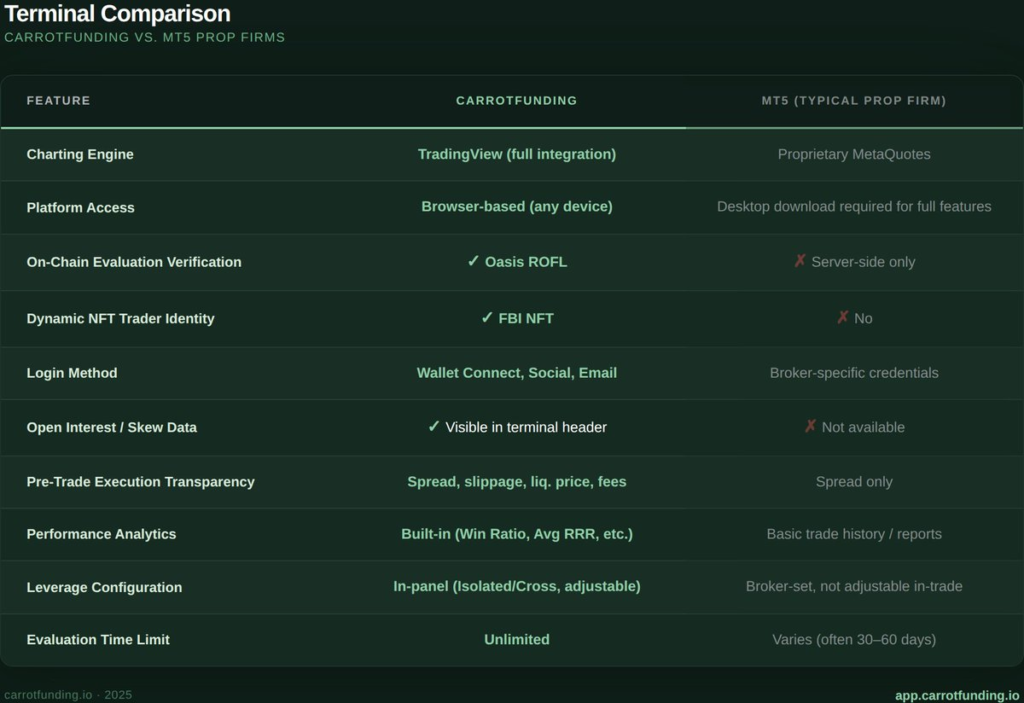
This article breaks down the carrotfunding terminal and how it compares to the MT5 setup most prop firms use. Not in theory, in practice. What you see, what you interact with and what changes about your day-to-day trading experience.
No spin. Just a feature-for-feature walkthrough so you can decide for yourself.
MetaTrader 5 is the industry default. Over a thousand brokers offer it. Most prop firms white-label it. There’s a reason for that: it’s stable, it’s familiar and it has two decades of ecosystem behind it.
But “default” isn’t the same as “optimal.” Here’s what the typical MT5 prop firm setup actually looks like from a trader’s perspective:
MT5 is a trading terminal. It does that job well. But prop trading isn’t just execution. It’s evaluation, risk management, progression and payout. MT5 handles one of those four things. The carrotfunding terminal handles all of them.
It’s not MT5 with a skin on it. It’s not a white-label of anything. Every component, from charting to risk tracking to challenge progression is built in-house, designed around how prop traders actually work.
The carrotfunding terminal is a fully integrated, browser-based trading environment. No downloads. No desktop dependency. It runs on any device with a browser.
Charting: TradingView Integration
The charting engine is TradingView. The same platform millions of traders already use for analysis. That means you get access to TradingView’s full indicator library, drawing tools, and multi-timeframe analysis directly inside the carrot terminal. No third-party plugins. No workarounds.
Available timeframes include 1-minute, 3-minute, 5-minute, 6-minute, 15-minute, 1-hour, 1-day, 5-day, 1-month, 3-month, 6-month, 1-year, and 5-year views. If you’ve used TradingView before, you already know this interface.
Compare that to MT5’s proprietary charting engine. MT5 has 21 timeframes and 80 built-in indicators, which is solid but if you’re like most traders, you’ve been using TradingView for your analysis anyway, then copying levels over to MT5 to execute. The carrot terminal eliminates that gap. Your analysis tool is your execution tool.
Order Execution
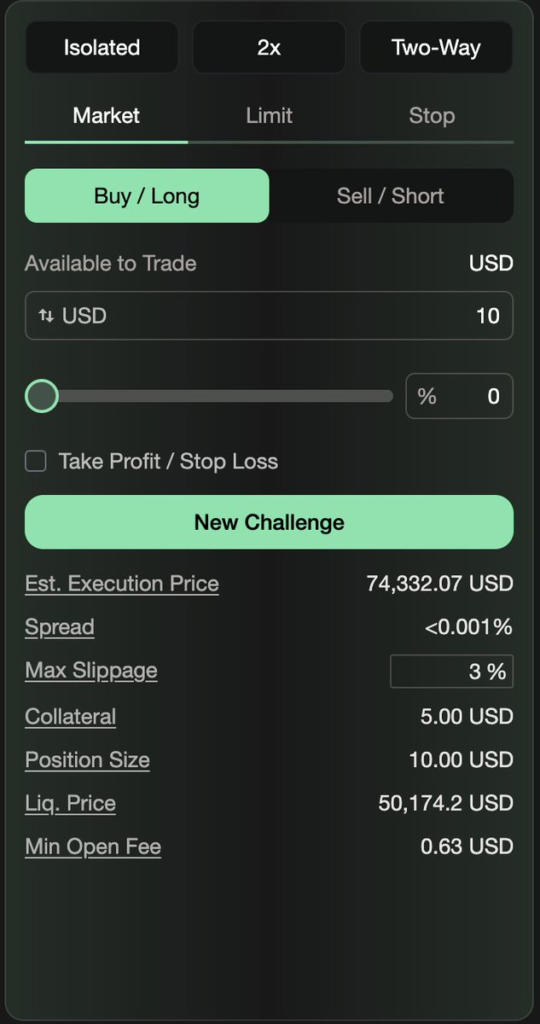
The terminal supports Market, Limit and Stop orders, with built-in Take Profit and Stop Loss fields directly in the order panel. You also see execution transparency data before you place a trade: estimated execution price, live spread, max slippage, collateral requirements, position size, and liquidation price.
This matters because MT5 shows you the order form. Carrot shows you the cost of the trade before you commit. You know your collateral, your liquidation price, and your minimum open fee before you click “Place Order.” No surprises.
Leverage is configurable directly in the order panel, choose Isolated or Cross mode, adjust leverage (up to the limits of your account), and toggle between Two-Way positions. All visible, all adjustable, all in one panel.
Market Intelligence: Data MT5 Doesn’t Show You
At the top of the carrot terminal, you see real-time market microstructure data that most prop firm setups don’t surface: Open Interest (Long and Short), market Skew percentage, and Holding data for both longs and shorts. This is DeFi-native data from the gTrade execution layer.
MT5 gives you bid/ask spreads and order book depth (where available). You can see how the market is leaning before you place your trade.
This is where the gap gets real. These aren’t cosmetic differences, these are structural features that change how you experience prop trading.
1. Real-Time Challenge Objectives: Inside the Terminal
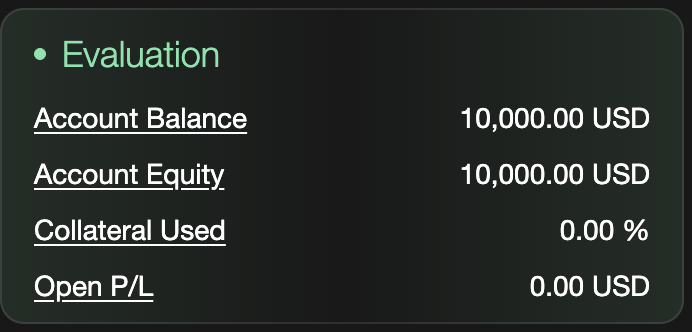
In the carrot terminal, your evaluation status is pinned to the right side of the trading screen. While you’re looking at charts and placing trades, you simultaneously see: Account Balance, Account Equity, Collateral Used and Open P/L.
On the separate Carrot dashboard, your challenge objectives are displayed as live progress bars: Profit Target (e.g., $0 of $400), Consistency Score (e.g., 0 of 70), Max Loss Limit (e.g., $0 of $500), and Daily Loss Limit (with a live countdown timer showing how much time remains in the current daily window).
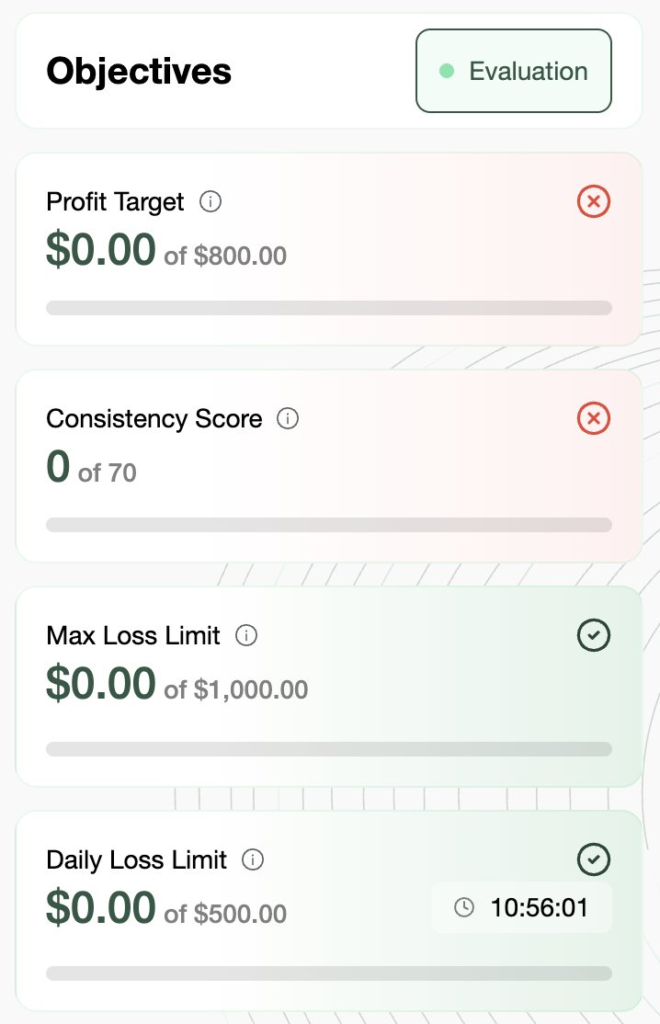
In an MT5 prop firm setup, none of this exists in the trading interface. You check your challenge status on a separate web dashboard.
2. On-Chain Verification via Oasis ROFL
Every Carrot challenge carries a “Verified by Oasis” badge. This isn’t a marketing label, it means your challenge evaluation is processed through ROFL (Runtime Off-chain Logic) on the @OasisProtocol, providing cryptographic proof that the evaluation ran correctly.
In practice: your challenge results are verifiable on-chain. The firm can’t retroactively change your evaluation. The rules that applied when you started are the rules that determine your outcome.
MT5 prop firms evaluate challenges on their own servers. You trust their internal system. At Carrot, you verify it yourself. No one, including MetaQuotes, has access to a broker’s trading servers or client databases. That’s their design. Which means when a prop firm runs MT5, MetaQuotes can’t verify whether the firm is solvent, honest, or paying out. Neither can you.
3. Carrot FBI: Your Trading Identity as a Dynamic NFT
Every challenge on Carrot is linked to an FBI (Funded Bunny Initiative) NFT. This isn’t a collectible gimmick. It’s a dynamic, on-chain record of your trader journey.
Your FBI NFT reflects real-time evaluation data: your current stage (Challenge, Verification, Funded or Inactive), your account size, your leverage mode and your live P/L. The NFT’s metadata updates as you progress. Your FBI number is visible directly in the terminal header while you trade.
4. Wallet Connect: One Login, Zero Passwords
Carrot uses Web3 wallet authentication, as well as social login and traditional email login. You connect your wallet once and you’re into everything: the terminal, the dashboard, your challenge history, your affiliate stats and your points balance. One identity. One login.
MT5 requires a broker-specific login per account. Different challenge, different credentials. Different firm, different download. Carrot’s wallet-based system is inherently simpler and inherently more secure. No passwords to leak, no email resets, no credential fatigue.
5. Built-In Performance Analytics
Your Carrot dashboard tracks Average Win, Average Loss, Win Ratio and Average Risk-Reward Ratio automatically. These update in real time as you trade. You don’t need a journal plugin, a third-party tracker or a spreadsheet.
MT5 generates trade reports and history logs, but structured performance analytics (especially challenge-specific metrics like consistency scoring) require external tools. Carrot builds them in by default.
This is a question every serious trader asks: where do my trades actually go?
The carrotfunding terminal runs a simulated trading environment that 100% reflects real trading conditions on gTrade (@GainsNetwork_io), a decentralized leveraged trading protocol. During the evaluation and verification stages, you’re trading in this simulated environment. The charts are real. The prices are real. The conditions mirror live gTrade execution.
Once you pass verification and become a funded trader (A-booked), your trades are connected to real capital and executed directly on gTrade. That’s where the on-chain transparency comes in: capital backing is verifiable and payout flows are auditable
In MT5 prop firm setups, you’re typically trading on the firm’s liquidity provider via the MetaQuotes bridge. You don’t see where your trades are routed. You don’t see the firm’s capital. And when payout time comes, you submit a request and wait.
At carrotfunding, the system pays. That’s not a promise. That’s how it’s engineered.
The Carrot terminal offers over 290 tradable pairs across crypto, forex, commodities, stocks, and indices. All within one interface, one account, one execution layer.
That’s 230+ crypto pairs, major and minor forex pairs, commodities including gold ($XAU), silver ($XAG), crude oil ($WTI), platinum ( $XPT), and palladium ( $XPD), 21 stocks, and 7 indices. Everything routes through gTrade. No separate platforms. No additional logins.
Leverage scales by asset class: up to 200x on forex, 50–75x on commodities, 50x on stocks, and 100x on indices in Aggressive mode. Normal mode caps at 5x across the board. You choose the mode per challenge.
MT5’s strength has always been forex and multi-asset coverage. Carrot now matches that breadth, but with DeFi infrastructure underneath. Same asset classes, fundamentally different trust model. Your trades execute on-chain. Your payouts are automated. The rules don’t change mid-challenge.
This isn’t a “MT5 is bad” article. MT5 is a proven platform with a massive ecosystem. If you’re happy with your current setup and your current firm pays out reliably, there may be no reason to change.
But if any of the following apply to you, the carrot terminal is worth exploring:
The carrot terminal is free to explore before you purchase a challenge. No paywall. No demo request form. No sales call.
See the TradingView charts. Check the order panel. Look at the market data. Browse the 290+ pairs. If it feels like an upgrade from what you’re currently using, start a challenge. If not, you haven’t spent a cent.
Experience it yourself!